
After a negotiation, it's important to close the case in the Quote Negotiation Agent – regardless of whether the negotiation was successful or not. This documents your result and helps the agent learn from every negotiation you conduct.
Cases waiting for your closure are marked with the status "Needs Review".
There are two ways to close a case:
Option 1: Via the Chat Function
When you're inside a case, you'll see the chat function at the bottom – the same one you use to interact with the agent regularly. Simply tell the agent to close the case and share the result.
For example: "Close this case. Supplier A granted a 7% discount."
The agent takes care of the rest and closes the case for you.

Good to know: If the negotiation was conducted via linked email communication, the agent already knows the result from the email context. In this case, you just need to trigger the closure – there's no need to enter the result manually.
Option 2: Via the Closure Icon
In the case view, you'll find a box icon at the top that lets you close the case directly. Click on it, and a window opens where you can enter the results.

Enter the negotiation outcome there – for example, which supplier was awarded and how much discount was granted.
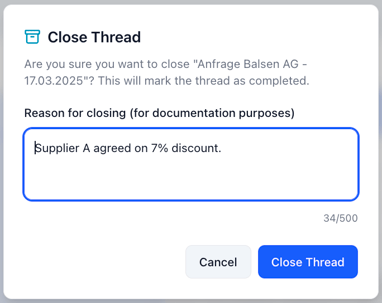
The same applies here: If the negotiation was conducted via linked emails, the agent already has the results in context and will pre-fill the relevant information.
What Happens After Closing?
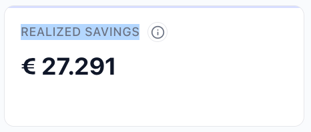
Once the case is closed, the status changes to "Closed". The achieved savings are captured as Realized Savings and become visible in two places:
- In the case overview, the Realized Savings are aggregated and displayed as a total in the KPI card.
- In the individual case, the achieved savings are shown as a separate entry.

Close Cases Without a Discount Too
Close every case – even when no discount was achieved. These cases are particularly valuable: The Quote Negotiation Agent learns from them which levers are less effective with which supplier, and adjusts its recommendations for future negotiations accordingly.
Video Guide
In this short video, we walk you through both options step by step:
Frequently Asked Questions
Can I reopen a closed case?
Yes. If something changes after closing, you can reopen the case and update the information.
Do I always need to enter the result manually?
Only if the negotiation was not conducted via linked email communication. For email-based negotiations, the agent already has the result in context.
How do I identify cases that still need to be closed?
All cases with the status "Needs Review" are waiting for your closure.
Summary
Closing a case works in two ways: directly via the chat function or via the box icon at the top of the case view. Close every case – whether a discount was achieved or not. After closing, the status changes to "Closed" and the Realized Savings become visible in your overview.