
There are two ways to start:
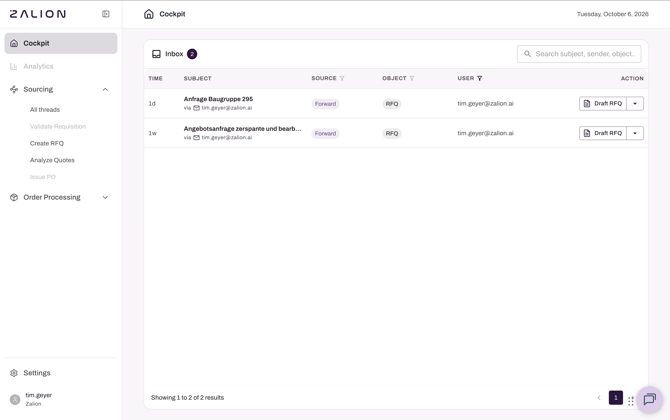
Option 1: Forward an email to your Zalion inbox
- Forward the request (for example from sales or engineering) to your company's Zalion inbox address. Your Zalion contact sends you this address, it's usually "companyname@prod.mail.zalion.ai".
- Open Cockpit. The email appears in your Inbox, including all attachments.
- Click Draft RFQ
Good to know: Zalion assigns the item to the person who forwarded it. The inbox is filtered to your items, but you can also see your colleagues' items, for example to cover holidays.
Option 2: Start from scratch
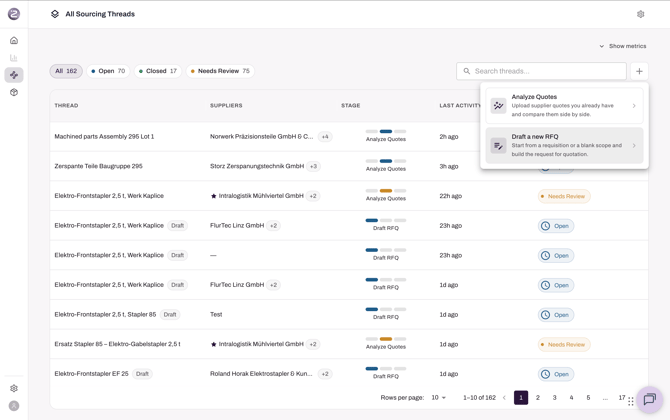
- Go to Sourcing → Create RFQ.
- Click + in the top right and choose Draft a new RFQ.
- Give the agent a starting point: upload a quote or file, paste a screenshot or text, or simply describe what you need and from whom.
Other inbox actions
| Action | Use it when |
|---|---|
| Draft RFQ | You need to request quotes. |
| Analyze Quotes | Supplier quotes have already arrived. |
| Link to thread | The email belongs to a running RFQ, e.g. a supplier replied in a new email thread. |
| Dismiss | The item needs no action. |